Showing posts with label Timing. Show all posts

Saturday, October 19, 2013

Building mobile game engine with Android NDK: 4 - timing service


all parts:
1 - installing the tools and running samples
2 - calling C++ library from Java
3 - abstracting types and logging
4 - timing service

 today we will create first from the set of services. It will be timing service. Service is here some class or set of classes that enclose some functionality and is fully reusable in future projects.

 Until now our engine run as fast as possible calling engine_tick method. In this method we set background color but so far we do not know how much time elapsed form previous call. So we have no information that would be handy in whatever you can imagine - timing animation, showing the player time spent in level, timing bombs explosion, etc.

Project structure

 On the image bellow you can see project structure. New files we are going to create today are highlighted with green. Beside this we will make changes into Main.cpp. As the timing service is the first one from set off services we will create in future we are also going to create Context class. This class works as a bag full of services which is easy to reference and handle inside game.
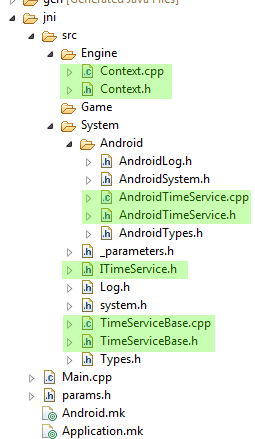

 As with the logging class we are preparing ourselves for future when we want to go cross-platform. ITimeService.h is abstract interface class that defines interface that will be common for all supported systems -  only Android now. TimeServiceBase is class that implements those parts of the ITimeService, that are the same for all systems. Finally, AndroidTimeService implements rest of the methods.

Implementation

 Listing for ITimeService.h is simple:
#ifndef ITIMESERVICE_H_
#define ITIMESERVICE_H_

#include "Types.h"
#include "Log.h"

namespace SBC
{
namespace System
{

class ITimeService
{
public:
 virtual ~ITimeService() {};

 virtual void reset() = 0;
 virtual void update() = 0;

 virtual f64 now() = 0;
 virtual f32 elapsed() = 0;
};

} /* namespace System */
} /* namespace SBC */
#endif /* ITIMESERVICE_H_ */

 The common base for all systems looks like this:
#ifndef TIMESERVICEBASE_H_
#define TIMESERVICEBASE_H_

#include "ITimeService.h"

namespace SBC
{
namespace System
{

class TimeServiceBase : public ITimeService
{
public:
 TimeServiceBase();
 virtual ~TimeServiceBase();
 void construct();

 void reset();
 void update();

 f64 now();
 f32 elapsed();

 static unsigned long getTickCount();

private:
 f32 mElapsed;
 f64 mLastTime;
};

} // namespace System
} // namespace SBC

#endif // TIMESERVICEBASE_H_

 We added some member variables to store elapsed time from last update of timer and also previous time. This base class also has construct method. This method is part of construction of the object. First the constructor is called and then construct method is called. It is called two-phase construction. Imagine that you are creating new object that needs to create several other objects on the heap. Next imagine that first of these objects is successfully created but you get out of memory error when constructing the second one. In such a case the original object is not constructed and thus its destructor is not called. But you already successfully created on of its child objects in constructor. Who will destruct it? Answer is no one - you will get memory leak.
 Opposite to this you can do two phase construction. First allocate the object and just initialize its member variables that do not need additional memory allocations or do thing that can not fail. Then call construct method that will do the rest. Good explanation and example of this can be found here.
 We are not allocating any memory for time service now. But what if there was system that would need it in future...

 Implementation of TimeServiceBase is here:
#include "TimeServiceBase.h"

#undef LOG_TAG
#define LOG_TAG "TimeServiceBase"

namespace SBC
{
namespace System
{

//------------------------------------------------------------------------
TimeServiceBase::TimeServiceBase() :
  mElapsed(0.0f), mLastTime(0.0f)
{
}

//------------------------------------------------------------------------
TimeServiceBase::~TimeServiceBase()
{
}

//------------------------------------------------------------------------
void TimeServiceBase::construct()
{
 LOGI("TimeService constructed");
}

//------------------------------------------------------------------------
void TimeServiceBase::reset()
{
 LOGI("TimeService reseted");
 mElapsed = 0.0f;
 mLastTime = now();
}

//------------------------------------------------------------------------
void TimeServiceBase::update()
{
 // Checks elapsed time since last frame. It is important to
 // work on double with current time to avoid losing accuracy
 // Then we can go back to float for elapsed time.
 double lCurrentTime = now();
 mElapsed = (f32)(lCurrentTime - mLastTime);
 mLastTime = lCurrentTime;
}

//------------------------------------------------------------------------
f64 TimeServiceBase::now()
{
 LOGE("Feature not implemented for current system");
 return 0;
}

//------------------------------------------------------------------------
f32 TimeServiceBase::elapsed()
{
 return mElapsed;
}

//------------------------------------------------------------------------
unsigned long TimeServiceBase::getTickCount()
{
 LOGE("Feature not implemented for current system");
 return 0;
}

} // namespace System
} // namespace SBC

 As you can see some methods just say "Feature not implemented for current system". I found this very useful when I was adding new Tizen system into my cross platform engine. As I was writing Tizen implementation of the all the services one by one I was able to run it and when I came across some that was not implemented yet I got log message about it but there was minimum of crashes. Also when see this you know there is needed some system specific implementation.

Android implementation

 Now we can implement Android specific parts. AndroidTimeService.h has this listing:
#ifndef TIMESERVICE_H_
#define TIMESERVICE_H_

#include "../TimeServiceBase.h"
#if (PLATFORM_ID == PLATFORM_ANDROID)

namespace SBC
{
namespace System
{

class TimeService: public TimeServiceBase
{
public:
 TimeService();
 virtual ~TimeService();

 f64 now();

 static unsigned long getTickCount();
};

} /* namespace System */
} /* namespace SBC */
#endif // PLATFORM_ANDROID

#endif /* TIMESERVICE_H_ */

and implementation is like this:
#include "AndroidTimeService.h"
#if (PLATFORM_ID == PLATFORM_ANDROID)

#undef LOG_TAG
#define LOG_TAG "TimeService"

#include <time.h>

namespace SBC
{
namespace System
{

//------------------------------------------------------------------------
TimeService::TimeService()
{
}

//------------------------------------------------------------------------
TimeService::~TimeService()
{
}

//------------------------------------------------------------------------
f64 TimeService::now()
{
 timespec lTimeVal;
 clock_gettime(CLOCK_MONOTONIC, &lTimeVal);
 return lTimeVal.tv_sec + (lTimeVal.tv_nsec * 1.0e-9);
}

//------------------------------------------------------------------------
unsigned long TimeService::getTickCount()
{
 timespec lTimeVal;
 clock_gettime(CLOCK_MONOTONIC, &lTimeVal);
 return lTimeVal.tv_sec * 1000 + (lTimeVal.tv_nsec * 1.0e-6);
}

} /* namespace System */
} /* namespace SBC */

#endif // PLATFORM_ANDROID

 In now method we are reading current time for monotonic clock. But, what is current time? According for example to this documentation you can read that it is "Clock that cannot be set and represents monotonic time since some unspecified starting point.". The starting point is often system boot. Fortunately it is not interested for us. We need it just to measure time leaps from one call to another and to calculate the elapsed time. Last time as well as elapsed time are in seconds.

Creating context class

 Our first service is created so let's put it into bag for services - into the context. But first we have to create this bag. This is the header for Context class. It is first class that is created in Engine directory of our engine structure:
#ifndef CONTEXT_H_
#define CONTEXT_H_

#include "../System/system.h"

namespace SBC
{
namespace Engine
{

class Context
{
public:
 Context();
 ~Context();

public:
 // application
 void setApplication(SBC::System::Application* aApplication);
 SBC::System::Application* getApplication();

 //time service
 void setTimeService(SBC::System::TimeService* aTimeService);
 SBC::System::TimeService* getTimeService();

private:
 SBC::System::Application* mApplication;
 SBC::System::TimeService* mTimeService;
};

} // namespace Context
} // namespace SBC

#endif // CONTEXT_H_

 As can be seen it is just set of getters and setters. Only interesting is destructor because ownership of all created services is handeled to context and it is then responsible for destructing them (except for application). In implementation you can see it:
#include "Context.h"

#undef LOG_TAG
#define LOG_TAG  "Context"

namespace SBC
{
namespace Engine
{

//------------------------------------------------------------------------
Context::Context()
{
 mApplication = NULL;
 mTimeService = NULL;
}

//------------------------------------------------------------------------
Context::~Context()
{
 LOGI("Deleting TimeService");
 if (mTimeService != NULL)
 {
  delete mTimeService;
  mTimeService = NULL;
 }
}

//------------------------------------------------------------------------
void Context::setApplication(SBC::System::Application* aApplication)
{
 mApplication = aApplication;
}

//------------------------------------------------------------------------
SBC::System::Application* Context::getApplication()
{
 return mApplication;
}

//------------------------------------------------------------------------
void Context::setTimeService(SBC::System::TimeService* aTimeService)
{
 mTimeService = aTimeService;
}

//------------------------------------------------------------------------
SBC::System::TimeService* Context::getTimeService()
{
 return mTimeService;
}

} // namespace Context
} // namespace SBC

 Maybe you noticed that in all .cpp files, there is defined LOG_TAG in the very top. This tag helps in debugging as all log messages from the same .cpp file are tagged with it.

 As a last step change system.h file - add TimeService to it:
// Android platform
#if (PLATFORM_ID == PLATFORM_ANDROID)
 // system
 #include "Android/AndroidSystem.h"
 // time service
 #include "Android/AndroidTimeService.h"

 As we have now also the context we can wire it into Main.cpp. We will initialize the services when the engine starts and destroy the context (and all services in it) when the engine is to be destroyed.

Wiring context

 Change top of the Main.cpp to this:
//BEGIN_INCLUDE(all)
#include "src/System/system.h"
#include "src/Engine/Context.h"

#undef LOG_TAG
#define LOG_TAG "Main"

using namespace SBC::System;
using namespace SBC::Engine;

Context* gContext = NULL;

 Adjust engine_start and engine_stop methods:
//------------------------------------------------------------------------
static void engine_start(JNIEnv* aEnv, jobject aObj, jobject aAssetManager)
{
 LOGD("Starting engine ...");

 AAssetManager* assetManager = AAssetManager_fromJava(aEnv, aAssetManager);
 
 // create context that holds particular system services
 LOGI("Creating game context");
 gContext = new Context();
 
 // SERVICES
 // time service
 LOGI("Creating and initializing TimeService");
 TimeService* tm = new TimeService();
 tm->construct();
 gContext->setTimeService(tm);

}

//------------------------------------------------------------------------
static void engine_stop(JNIEnv* aEnv, jobject aObj, jboolean aTerminating)
{
 LOGD("Stopping engine ...");
 
 LOGI ("Deleting game Context");
 if (gContext != NULL)
 {
  delete gContext;
  gContext = NULL;
 }
}

and also adjust resume_engine method. We will reset the time service in it:
//------------------------------------------------------------------------
static void engine_resume(JNIEnv* aEnv, jobject aObj)
{
 LOGI("Resuming engine - resetting time");
 gContext->getTimeService()->reset();
}

 Finally, to see some effect change engine_tick method to this:
//------------------------------------------------------------------------
static void engine_tick(JNIEnv* aEnv, jobject aObj)
{
 TimeService* time = gContext->getTimeService();
 time->update();


 // do something
 static f32 counter = 0.0f;
 f32 elapsedTime = time->elapsed();
 counter += elapsedTime;
 if (counter > 1.0f)
  counter = 0.0f;

 // Just fill the screen with a color.
 glClearColor(1.0f - counter, 1.0f, counter, 0.0f);
 glClear(GL_COLOR_BUFFER_BIT);
}

 the counter variable is based on value of counter and the screen is blinking from yellow to light blue. The complete change of color takes 1 second.

Conclusion

 Today we created first of engine services - the TimeService. It tells us how much time elapsed from last tick and we can use this information to adjust whatever is based on real time in the game. Thanks to this we can base for example our animations on real time and not on frame rate which may differ from device to device.

 Download TutGame-04.zip


Wednesday, May 8, 2013

Bounce timing / easing function


Working on our next game the graphic designer designed one of the animations in such a way that I needed to write special timing function. There is big block falling from top of the screen, that bounces several times and stays still. I wanted to enrich my engine with function that will not only do this job, but will be also useful in future. I ended with flexible function that produces bounces based on given parameters and on the next lines I will describe it step by step.

Parameters & result

 I will start with brief gallery of achieved results. The function takes four parameters:
  •  duration of whole effect in seconds,
  •  number of bounces (actually how much times the floor is touched),
  •  elasticity,
  •  whether to start the first bounce from floor or from top
 You can call the function with all four parameters set but if you want for example bounce three times and stay still then you can omit elasticity (set to -1) and the function will calculate it for you. On the following pictures is what I am exactly writing about - I am asking to produce such a curve that it should take 3 seconds and 3 bounces and then the bouncing object will stay still. In first case I want to start it from top (for example something may fall from off screen region into visible area) and in the second case I want to make it jump from bottom:


  In the first of following two I am saying, that I want 3 seconds again, elasticity 0.5 and start from top. I do not know how many bounces is necessary to leave the object on floor. But the function calculates for me it is 8 of them and calculates the speed of move to squeeze it into 3 seconds.
 In the second I am setting the elasticity over 1 so I will overshot 0.0-1.0 output range and so I have to define the number of bounces else the function would try to squeeze infinite number of bounces into three seconds. It ends itself only when zero height is reached or when requested number of bounces is met.


Header

 Look at the header file below. You will see we are defining some variables, constants and functions. The constants will limit our function to 10 bounces as well as it defines epsilon error value that will be explained during implementation.
 The variables holds the ones needed for whole function - as its duration, number of bounces, elasticity, calculated acceleration and so on. And it also holds values specific for every single bounce - its duration, initial velocity and height. Yes, the resulting function faces itself for programmer as single function but it is inside series of individual consecutive bounces.
 The functions are simple getters (imagine you are calling with unknown number of bounces in initialization; you can ask then how many of them was calculated) and functions that set and return the height based on duration progress.

 One remark: the function is taken from my cross-platform engine (you can read other posts regarding it on this blog) so do not get confused with specific namespaces. Rewrite them with yours or delete it.


#ifndef TIMINGBOUNCE_H_
#define TIMINGBOUNCE_H_

#include "../../System/system.h"

namespace SBC
{
namespace Engine
{

class TimingBounce
{
public:
 static const u32 BOUNCES_MAX = 10;
 static const f32 EPSILON;
 static const f32 INTERNAL_HEIGHT;

public:
 TimingBounce();
 virtual ~TimingBounce();

public:
 void initialize(f32 aDuration, s32 aBounces, f32 aElasticity = -1.0f, bool aHalveFirstBounce = true);
 f32 tick(f32 aDeltaTime);
 f32 getActual();
 f32 getAt(f32 aDurationProgress);

 // getters
 f32 getDuration();
 f32 getDurationProgress();
 s32 getBounces();
 f32 getElasticity();
 f32 getAcceleration();

private:
 // duration of function
 f32 mDuration;
 // actual position in duration
 f32 mDurationProgress;

 // number of bounces
 s32 mBounces;
 // elasticity - how high is next amplitude
 f32 mElasticity;
 // acceleration for requested parameters
 f32 mAcceleration;
 // start from peek or from bottom
 bool mHalveFirstBounce;

 // duration of particular bounces
 f32 mBounceDuration[BOUNCES_MAX];
 // height of particular bounces
 f32 mBounceHeight[BOUNCES_MAX];
 // bounce velocity
 f32 mBouceVelocity[BOUNCES_MAX];
};

} /* namespace Engine */
} /* namespace SBC */
#endif /* TIMINGBOUNCE_H_ */


Implementation

 Next follows the implementation. It is cut into pieces and described and explained step by step:

 We simply start with defining some of the constants. The EPSILON is error member and is set to 1, which is in most cases 1 pixel on the screen. The INTERNAL_HEIGHT is defined as 1000. The function inside calculates the height of bounces in range 0-1000 and this is then normalized into 0-1 before vales are returned to client.

 Constructor simply sets initial values. Actually undefined elasticity (-1.0f) and zero number of bounces are together invalid parameters.


#include "TimingBounce.h"

#undef LOG_TAG
#define LOG_TAG  "TimingBounce"

namespace SBC
{
namespace Engine
{

using namespace SBC::System::MathUtils;

const f32 TimingBounce::EPSILON = 1.0f;
const f32 TimingBounce::INTERNAL_HEIGHT = 1000.0f;

//------------------------------------------------------------------------
TimingBounce::TimingBounce()
{
 mDuration = 0.0f;
 mDurationProgress = 0.0f;
 mBounces = 0;
 mElasticity = -1.0f;
 mAcceleration = 0.0f;
 mHalveFirstBounce = false;
}

//------------------------------------------------------------------------
TimingBounce::~TimingBounce()
{
}

Now comes the initialize function where most of the fun takes place:


//------------------------------------------------------------------------
void TimingBounce::initialize(f32 aDuration, s32 aBounces, f32 aElasticity, bool aHalveFirstBounce)
{
 // check parameters validity
 if (aBounces <= 0 && aElasticity < 0.0f)
 {
  LOGE("Invalid parameters (aBounces = %i, aElasticity = %f)", aBounces, aElasticity);
  return;
 }
 else if (aDuration < 0.0f)
 {
  LOGE("Duration cannot be less than zero");
  return;
 }

 First we check whether input parameters are correct. Either one of aBounces or elasticity must be defined (bounces higher than zero and / or elasticity also higher than 0).


 // calculate missing parameters
 // if defined bounces but not elasticity
 if (aBounces > 0 && aElasticity < 0.0f)
 {
  aElasticity = Math::pow(EPSILON / INTERNAL_HEIGHT, 1.0f / aBounces);

 }
 // if defined elasticity but not bounces
 else if (aElasticity > 0.0f && aBounces <= 0)
 {
  if (aElasticity >= 1.0f)
  {
   LOGE("Elasticity must be less than 1");
   return;
  }

  // EPSILON = aElasticity ^ aBounces ... aBounces = log_aElasticity EPSILON = ln EPSILON / ln aElasticity
  aBounces = Math::log(EPSILON / INTERNAL_HEIGHT) / Math::log(aElasticity);
 }

 If we know the number of bounces and elasticity is unknown we have to calculate it. It will have such a value that after requested number of bounces the potential next bounce would had its height less or equal to EPSILON. It comes from calculation:
 
EPSILON = INTERNAL_HEIGHT elasticity bounces "EPSILON" = "INTERNAL_HEIGHT" * func elasticity^{bounces}
elasticity = (EPSILON / INTERNAL_HEIGHT) 1 / bounces elasticity = {EPSILON / "INTERNAL_HEIGHT"} ^{ 1 / bounces}

 In second case the unknown are the bounces so the calculation is:

bounces = log ( EPSILON / INTERNAL_HEIGHT ) log ( elasticity ) bounces = {log("EPSILON" / "INTERNAL_HEIGHT") } over {log(elasticity)}

Now when we know the parameters we can save it:


 // store parameters
 mDurationProgress = 0.0f;
 mBounces = aBounces;
 mElasticity = aElasticity;
 mHalveFirstBounce = aHalveFirstBounce;

 But with the parameter above we still do not know how much time the function will take. We request some time but we do not know the speed. So, we have to calculate it. As the whole function is not a single function but internally it is sequence of functions we will choose some random speed to calculate how much time each bounce takes and calculate the total time
 Each bounce takes 2 times the result of:
 
height= 1 2 acceleration time 2 duration = {1} over {2} acceleration * time^{2}
 
time = 2 height acceleration time = sqrt{2* {height} over {acceleration} }

  Two times because we have to reach the top of bounce and then the same time it takes to fall down.

 // get "some" acceleration and calculate time for bounces
 f32 acceleration = INTERNAL_HEIGHT / 1000.0f;
 f32 totalDuration = 0.0f;
 f32 height = INTERNAL_HEIGHT;
 for (s32 i = 0; i < mBounces; i++)
 {
  // s = 1/2 a * t^2 ... 2s / a = t^2 ... sqrt(2s / a) = t
  f32 duration = Math::sqrt(2 * height / acceleration) * 2;

  if (mHalveFirstBounce && i == 0)
   duration /= 2;

  mBounceDuration[i] = duration;
  mBounceHeight[i] = height;

  totalDuration += duration;
  height *= mElasticity;
 }

 Let's say that the total duration resulted in 340 seconds with some initial velocity. This is more than 100 times more than we requested. But as we have the time ratio between the bounces we can adjust it to our requested time:

 // adjust total duration to fit requested duration
 mDuration = 0.0f;
 for (s32 i = 0; i < mBounces; i++)
 {
  f32 duration = mBounceDuration[i] * aDuration / totalDuration;
  mBounceDuration[i] = duration;
  // sum up to avoid imprecision
  mDuration += duration;
 }

 Now, when we are in requested time limit, we have to calculate the acceleration that will help us to achieve it (again the same formula is used but the unknown is the acceleration this time):


 // calculate new acceleration
 f32 firstHalfBounceDuration = mHalveFirstBounce ? mBounceDuration[0] : mBounceDuration[0] / 2;
 // s = 1/2 a * t^2 ... 2s / t^2 = a
 mAcceleration = (2.0f * INTERNAL_HEIGHT) / (firstHalfBounceDuration * firstHalfBounceDuration);


 Finally we can calculate the parameters for each bounce:


 // calculate initial bounce velocities
 for (s32 i = 0; i < mBounces; i++)
 {
  // v = v0 + at ... on the top of bounce the v equals zero => v0 = -at
  // if bounce starts halved (on top) than its initial velocity is zero
  // halve duration of each bounce (as it contains the way up and down)
  if (i == 0 && aHalveFirstBounce)
   mBouceVelocity[i] = 0.0f;
  else
   mBouceVelocity[i] = mBounceDuration[i] / 2.0f * mAcceleration;
 }


 // change the sign of acceleration to point downwards
 mAcceleration = -mAcceleration;

 The debug output is now commented out:


 // debug output
 /*
 LOGD("Bounces: %i, Elasticity: %f, Acceleration: %f, Duration: %f, HalveFirstBounce %s",
   mBounces, mElasticity, mAcceleration, mDuration, mHalveFirstBounce ? "true" : "false");
 for (s32 i = 0; i < mBounces; i++)
 {
  LOGD("Bounce %i: height = %f, duration = %f, velocity = %f",
    i, mBounceHeight[i], mBounceDuration[i], mBouceVelocity[i]);
 }
 */
}

 The function is initialized now so we can start using it. There are three function - one tracks current position within requested time and is called tick(). Its parameter is time elapsed from last frame so you can feed it with your game loop timing steps. The second takes the value for current position and the last one returns value from any requested position. this one is the most important one and it is the place where things happens:


//------------------------------------------------------------------------
f32 TimingBounce::tick(f32 aDeltaTime)
{
 // adjust progress
 mDurationProgress += aDeltaTime;

 // return actual value
 return getAt(mDurationProgress);
}

//------------------------------------------------------------------------
f32 TimingBounce::getActual()
{
 return getAt(mDurationProgress);
}

//------------------------------------------------------------------------
f32 TimingBounce::getAt(f32 aDurationProgress)
{
 // check time bounds
 if (aDurationProgress < 0.0f)
  aDurationProgress = 0.0f;
 else if (aDurationProgress > mDuration)
  aDurationProgress = mDuration;

 After check of bounds we have to find index of the bounce we are currently in:


 s32 index = 0;
 f32 totalDuration = 0.0f;

 // get index to particular bounce
 while(index < mBounces && aDurationProgress > totalDuration + mBounceDuration[index])
 {
  totalDuration += mBounceDuration[index];
  ++ index;
 }

 // get duration within bounce (if not the first one)
 aDurationProgress = aDurationProgress - totalDuration;

 and then we can calculate the height in range 0 - INTERNAL_HEIGHT and normalize it to 0-1:


 f32 height = 0.0f;
 if (index == 0 && mHalveFirstBounce)
 {
  // height = height + 1/2 * mAcceleration * aDurationProgress^2
  height = INTERNAL_HEIGHT + mAcceleration * (aDurationProgress * aDurationProgress) / 2.0f;

 }
 else
 {
  // height = mBounceVelocity * aDurationProgress + 1/2 * mAcceleration * aDurationProgress^2
  // height = aDurationProgress * (mBounceVelocity + 1/2 * mAcceleration * aDurationProgress)
  height = aDurationProgress * (mBouceVelocity[index] + (mAcceleration * aDurationProgress) / 2.0f);
 }


 return height / INTERNAL_HEIGHT;
}

 For completeness here are also getter functions:


//------------------------------------------------------------------------
f32 TimingBounce::getDuration()
{
 return mDuration;
}

//------------------------------------------------------------------------
f32 TimingBounce::getDurationProgress()
{
 return mDurationProgress;
}

//------------------------------------------------------------------------
s32 TimingBounce::getBounces()
{
 return mBounces;
}

//------------------------------------------------------------------------
f32 TimingBounce::getElasticity()
{
 return mElasticity;
}

//------------------------------------------------------------------------
f32 TimingBounce::getAcceleration()
{
 return mAcceleration;
}

} /* namespace Engine */
} /* namespace SBC */


Usage

 To demonstrate the use our bouncing function all you have to do for example is something like this (this will produce the output you have seen on the first graph):


 TimingBounce b;
 b.initialize(3.0f, 3, -1.0f, true);

 for (f32 i = 0.0f; i < 3.0f; i = i + 0.01f)
  LOGD("height: %f", b.tick(0.01f));


Conclusion

 So, we created bouncing function that is flexible enough. It also hides all its details (series of functions) inside and the user just initializes it with desired values. You can download the source here.